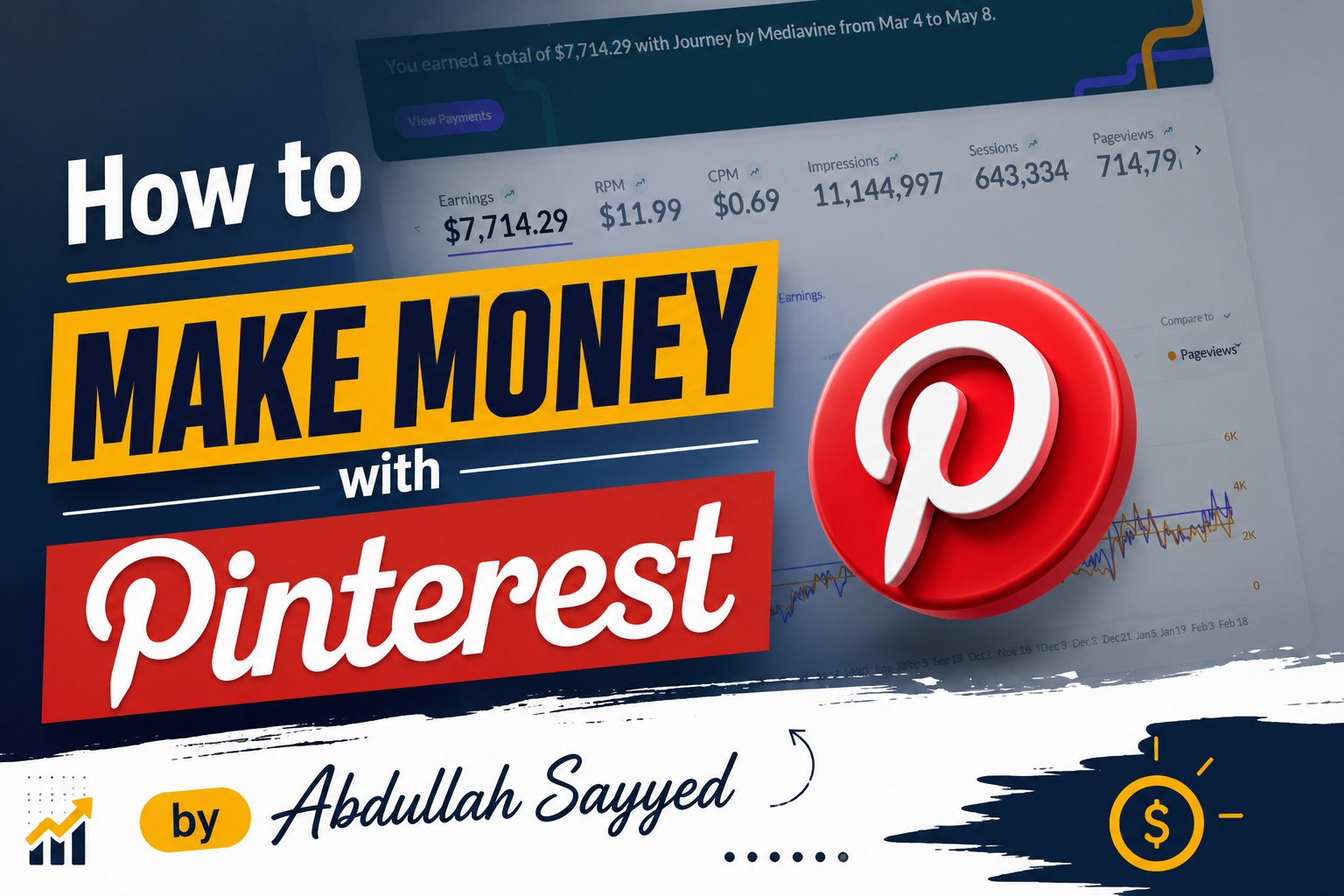
Pinterest is not just a place to save pretty pictures. It is one of the most powerful platforms to make real money online in 2026.
Millions of people use Pinterest every day to find ideas, products, and inspiration. This means there is a huge chance for you to reach the right people and earn from it.
The best part is that you do not need to be a big brand or have a huge following to start. Even beginners can make money on Pinterest with the right strategy.
In this guide, we will show you exactly how to do it. Step by step, simple and clear so you can start as soon as today.
Best Niches on Pinterest That Bring Evergreen Traffic in 2026
Choosing the right niche is the first step. These niches bring consistent traffic all year round and have strong earning potential.
🏠 Home Decor — People always want to improve their homes, so this niche never goes out of trend. Best for high RPM ads + affiliate (Amazon, Wayfair).
🍕 Food & Recipes — One of the biggest niches on Pinterest with millions of daily searches. Best for high blog traffic + display ads RPM.
👗 Fashion — People search for outfit ideas every season, making it always relevant. Best for affiliate marketing (LTK, Amazon Fashion).
💄 Beauty & Skincare — Huge audience, especially women, who love product recommendations. Best for affiliate + brand deals (high commissions).
🛠️ DIY & Crafts — Very popular on Pinterest because people love step-by-step project ideas. Best for high traffic + digital product sales.
💪 Health & Wellness — A growing niche with people always searching for better lifestyle tips. Best for high RPM ads + affiliate.
🏋️ Fitness — Workout routines and tips get shared massively on Pinterest every day. Best for affiliate (supplements, equipment) + digital products.
✈️ Travel — People plan trips using Pinterest, making it a great traffic source. Best for high RPM ads (travel CPM is very high).
💰 Personal Finance — Saving tips, budgeting, and income ideas perform extremely well. Best for highest RPM niche on most ad networks.
🌿 Lifestyle — A broad niche that covers daily life, routines, and habits. Best for consistent traffic + multiple monetization options.
👶 Parenting — Parents constantly search for tips, activities, and product ideas. Best for affiliate + high RPM ads.
💍 Wedding — Brides plan everything on Pinterest, from decor to dresses. Best for affiliate + sponsored content (high buyer intent).
🌱 Gardening — A very loyal and passionate audience that keeps coming back. Best for affiliate (tools, seeds) + display ads.
🤖 Technology & AI — Fast-growing niche as people want to learn about new tools. Best for high RPM + digital products.
📚 Education & Study — Students and learners search for resources and printables constantly. Best for digital product sales (templates, notes).
💼 Business & Entrepreneurship — Ambitious audience looking for strategies and tools to grow. Best for high RPM + affiliate (software, courses).
📦 Digital Products — You can sell your own products like eBooks or templates directly. Best for passive income + highest profit margins.
⏰ Productivity — People always want to be more organized and efficient. Best for digital products (planners, templates) + affiliate.
📷 Photography — Creatives search for tips, presets, and gear recommendations. Best for affiliate (gear, Lightroom presets) + digital products.
🎨 Art & Design — Visual niche that fits perfectly with Pinterest’s image-first format. Best for selling art, digital products + Etsy affiliate.
Out of all the niches, we are going with Fashion for this journey. And there are very strong reasons behind this choice.
Why We Are Choosing Fashion as Our Niche
Out of all the niches listed above, we are going with Fashion for this journey. This niche has everything evergreen traffic, brand deals, affiliate income, and ad revenue all in one place.
Fashion people always search for outfit ideas and styling tips on Pinterest every single day. That is why Fashion is our pick and the rest of this guide will be based around it.
How to Choose the Perfect Domain Name for Your Pinterest Blog
Before you start your blog, you need a good domain name. A great domain name makes your brand look professional and trustworthy from day one.
To make this easy, we have created a ready-made prompt for you. Just copy this prompt and paste it into any AI tool like ChatGPT, Claude, Gemini, or any other AI you prefer.
📋 Copy This Prompt:
Act as a Pinterest SEO + Branding Expert. Your task is to generate 10 Pinterest-optimized domain name ideas for my niche. First, ask me this: "What is your niche?" After I reply with my niche, generate domain names using these rules:

Domain names must be EXACTLY 3 words

Must sound brandable, catchy, and Pinterest-friendly

Must be easy to remember and easy to spell

Must target the niche naturally

Prefer keyword-rich combinations for SEO

Must feel like a real content/blog brand

Add ".com" to every domain

Avoid hyphens and numbers

Keep names modern and clean

Also:

Give a mix of aesthetic, keyword-based, and viral-style names

Prioritize names that could work well for Pinterest traffic and Google SEO

Make sure the names look available/unique (do not use famous brand names)

Output format: 1. DomainName.com 2. DomainName.com 3. DomainName.com

Example input: Kitchen Decor Ideas

*Example output:

CozyKitchenStyle.com

ModernKitchenGlow.com

DreamDecorKitchen.com*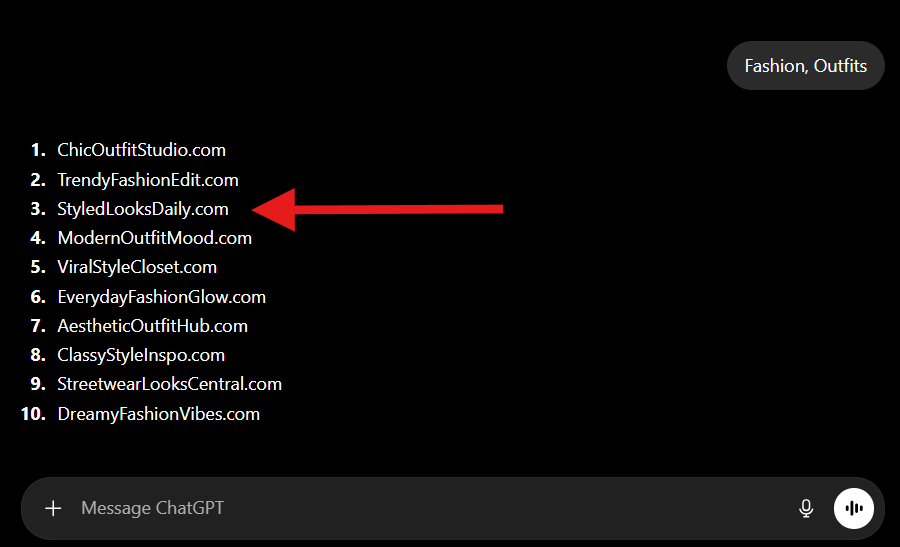
Just paste this prompt, tell the AI your niche, and it will give you 10 great domain name ideas in seconds. Then pick the one that feels right to you and check if it is available on Namecheap or GoDaddy.
How to Buy the Right Domain Name
We have chosen StyledLooksDaily.com for this series. You should also pick your domain from the AI suggestions and get ready for the next step.
But before you buy any domain, there are 3 very important checks you must do first. Skipping these can waste your time and money.
✅ Check 1 — Web Archive History
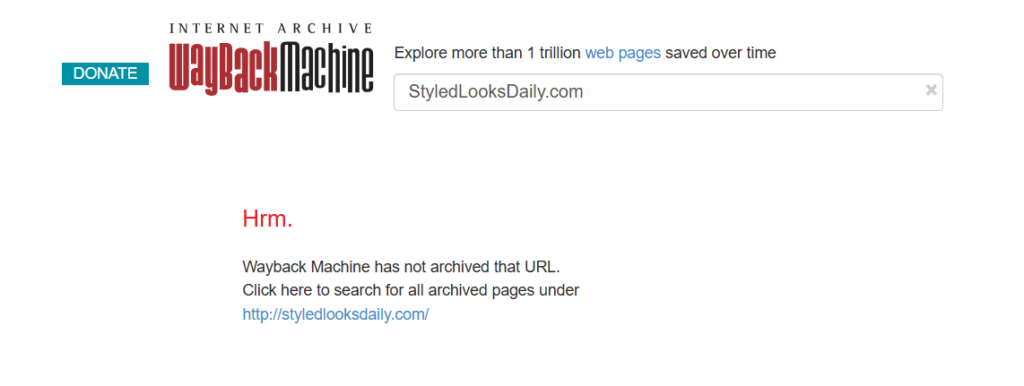
Go to web.archive.org and type your domain name there. This will show you if the domain was used before and what kind of website it was.
If the old website had bad or spammy content, that history can hurt your new blog. Always pick a domain that is clean and fresh with no bad history.
✅ Check 2 — Free Backlinks Checker
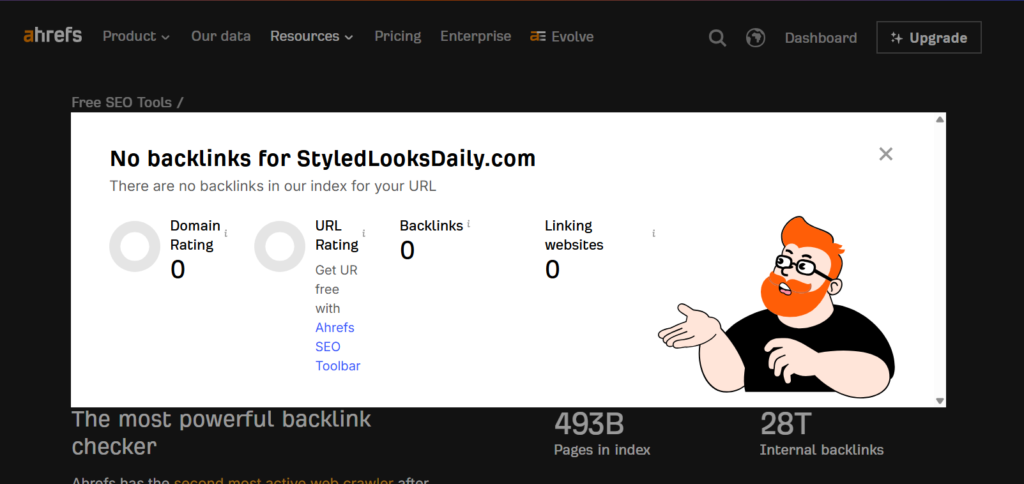
Go to any free backlinks checker tool like Ahrefs Free, Ubersuggest, or Moz. Type your domain and check the backlink profile.
If the domain has hundreds of spammy backlinks, stay away from it. A clean domain with zero or very few backlinks is always the best choice.
✅ Check 3 — Pinterest Block Check
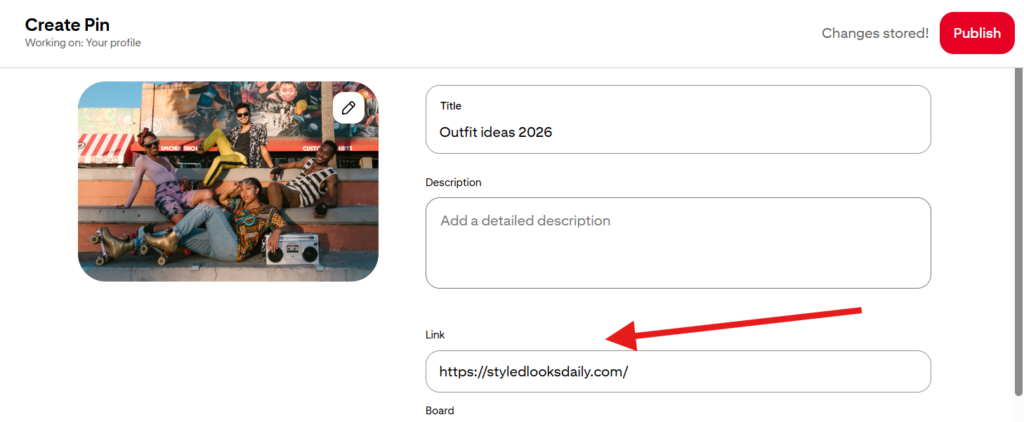
This is the most important check. Go to Pinterest, create a new Pin, add any simple image, and paste your domain URL in the link box.
If the URL box turns red, that domain is already blocked by Pinterest. Do not buy that domain because Pinterest will never allow your content to get traffic.
Only buy the domain after it passes all 3 checks. Then go to Namecheap or GoDaddy and register it.
How to Find the Right Keywords and Categories for Pinterest
Once your domain is ready, the next step is keyword and category research. Without this, you are just guessing what to post and that wastes a lot of time.
The best tool for this is pinclicks.com. Think of it like Ahrefs or Semrush but specifically built for Pinterest research.
How to Use PinClicks for Keyword Research
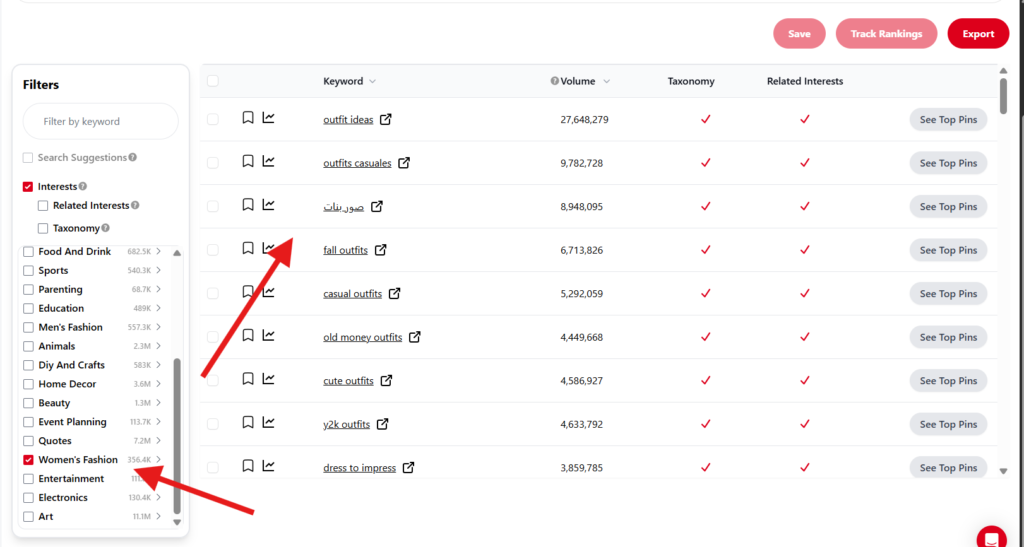
Go to PinClicks and on the left side you will see a list of categories and interests. Simply select Women’s Fashion and the tool will show you all the keywords people are searching inside that category.
As you can see in the screenshot above, keywords like Outfit Ideas have 27 million+ searches, Fall Outfits has 6.7 million, and Old Money Outfits has 4.4 million. These are real people actively searching for this content every single day.
Why This Data Matters
These numbers tell you exactly what topics to create content on. You are not guessing anymore, you are creating content that people are already searching for.
This is the difference between a blog that gets traffic and a blog that gets nothing. Always do your keyword research first before writing a single word.
How to Find Blog Post Ideas Using PinClicks and AI
Now that our first category is finalized Casual Outfit Ideas it is time to find exactly what blog posts we will write. This is where the real content planning begins.
First go to PinClicks, select your category, and copy all the keywords you see in the list. Do not filter anything yet, just copy the full raw keyword data.
Now Open Any AI Tool and Paste This Prompt
Now that our keyword research is done, it is time to plan our first category. Our first board and content focus will be Casual Outfit Ideas a high traffic, evergreen sub-niche inside Women’s Fashion.
The next step is to go to PinClicks, select your category, and copy all the keyword data you see. Just select and copy the entire keyword list from the tool.
Now Use This AI Prompt to Generate Your Content Plan
Once you have your keyword list, open any AI tool like ChatGPT, Claude, or Gemini. Paste your copied keywords along with this prompt below and the AI will do the rest.
This prompt will clean your keywords, remove duplicates, and give you 30 viral Pinterest blog titles plus 10 informational blog topics all ready to use.
📋 Copy This Prompt:
Act as a Pinterest SEO Expert + Viral Blog Strategy Generator.
Your task is to create:

30 Pinterest-optimized viral blog titles
10 informational blog topic ideas

from my keyword list.
First, ask me this:
"Paste your keyword list."
After I provide the keywords, follow these rules carefully:
KEYWORD CLEANING RULES:

Remove duplicate keywords
Remove same-meaning/repetitive keywords
Keep only the strongest and most searchable keywords
Keep niche relevance high
Prioritize Pinterest-friendly and SEO-friendly keywords

PART 1 — VIRAL PINTEREST TITLES
Generate 30 UNIQUE Pinterest-optimized blog titles.
RULES:

Titles must be highly clickable and Pinterest-friendly
Focus mainly on "Ideas" style content
Use numbers mostly between 10–15
Mix formats naturally: Ideas, Inspiration, Trends, Outfits, Tips, DIY, Hacks, Styles, Themes
Titles should feel viral and emotionally engaging
Avoid robotic wording
Avoid repeating the same title structure
Optimize for both Pinterest SEO and Google SEO
Every title must target a different keyword variation
Do NOT generate duplicate or near-duplicate titles
Keep titles natural and human-written

PART 2 — INFORMATIONAL BLOG TOPIC IDEAS
Generate 10 informational article ideas using the same keyword list.
PURPOSE:
These articles should help build topical authority and trust so the website does not look like it only publishes traffic-focused Pinterest listicles.
RULES:

Topics should be educational, helpful, and evergreen
Focus on: Guides, Mistakes, Beginner tips, How-to articles, Trend explanations, Styling guides, Buying guides, FAQs, Planning tips, Expert advice
Titles should still be SEO-friendly
Make them sound useful and trustworthy
Avoid clickbait for informational topics

OUTPUT FORMAT:
Cleaned Keywords:

keyword 1

30 Pinterest Titles:
1. Title Here
10 Informational Blog Topics:
1. Topic Here
Just paste your keywords after the prompt and the AI will give you a complete content plan in seconds. This saves you hours of manual work and gives you data-backed content ideas.
What You Will Get From This Prompt
You will get a fully cleaned keyword list with no duplicates or weak keywords. This alone saves you a lot of confusion about what to target.
Then you will get 30 ready-to-use viral blog titles that are already optimized for both Pinterest and Google. You do not need to think of a single title yourself.
And the 10 informational blog topics will make your website look like a real trusted blog. This helps with Google rankings and also makes your site look professional to brands and sponsors.
So in just one prompt, your entire content calendar for weeks is ready. No guesswork, no wasted time just a clear plan to follow.
How to Write Blog Content Using AI
Now that you have your blog titles ready, the next step is to actually write the content. The good news is you do not have to write a single word yourself — AI will do it all for you.
There are 2 methods to create your blog content and both of them work really well.
Method 1 — Use Real Instagram Images + AI Descriptions
This method is great when you want to use real outfit photos in your blog. The content feels very natural and visually rich because it is based on real images.
Here is how it works step by step:
Step 1 — Search on Instagram Take your blog title and find its seed keyword. For example if your title is “10 Sunday Church Outfit Ideas Every Stylish Girl Will Love” then your seed keyword is Sunday Church Outfit.
Step 2 — Shortlist Images Search that keyword on Instagram and browse through the results. Shortlist around 10 to 12 good quality outfit images and download them.
Step 3 — Use This Prompt on ChatGPT Now open ChatGPT and paste the prompt below. Upload your images one by one and ChatGPT will write a full Pinterest-optimized description for each image automatically.
📋 Copy This Prompt for Method 1:
You are a professional Pinterest SEO writer, fashion content strategist, and visual storyteller.
Your job is to create highly engaging, emotionally rich, Pinterest-optimized image descriptions using:
1. The uploaded image
2. The article title
The writing MUST feel natural, stylish, human, and visually immersive — NOT repetitive or AI-generated.
STEP 1 — When the user starts the chat, ONLY say:
"Please upload your image and enter your article title."
Do not generate content until both are provided.
STEP 2 — Once the image and title are provided, analyze:

Outfit style, mood and vibe, colors, styling details
Fashion aesthetic, pose, season feeling, occasion
The search intent behind the article title
What Pinterest users would emotionally want from this content

WRITING STYLE RULES:

Every description MUST feel different
Do NOT start every paragraph with "This outfit…"
Do NOT repeat identical sentence structures
Use storytelling, emotional hooks, and visual imagination
Write like a fashion blogger, not AI

You can begin descriptions using the mood, color palette, styling detail, confidence, occasion feeling, or overall energy.
OUTPUT FORMAT:
1. IMAGE HEADING
2. PARAGRAPH 1
3. PARAGRAPH 2
After every description, always end with: "Please upload the next image."
MEMORY RULE: Ask for the article title ONLY once. Remember it throughout the conversation. For every next image, only generate a new description — do NOT ask for the title again.
This prompt will write a unique heading and two paragraphs for every image you upload. Just keep uploading images one by one and your full article will be ready.
Method 2 — Let AI Write the Full Article With Image Prompts
This method is even faster. You do not need any real images at all because AI will write the full article and also give you image prompts that you can use to generate images with tools like Midjourney or ChatGPT image generation.
Just open ChatGPT, paste the prompt below, and when it asks for your title — give it any title from your list. It will write the complete article for you.
📋 Copy This Prompt for Method 2:
You are a professional Pinterest SEO article writer and viral fashion content creator.
STEP 1: Always ask only this first:
"Please enter your article title or keyword. Example: 15 Casual Women Outfit Ideas"
Do not generate the article until the user provides the title.
STEP 2: After the user provides the title, generate a fully Pinterest optimized fashion article using all rules below.
MAIN NICHE: Women Outfit Ideas, Casual Fashion, Street Style, Seasonal Outfit Ideas, Pinterest Fashion Trends, Aesthetic Fashion, Modern Women Styling
WRITING STYLE RULES:

Must feel human written, Pinterest friendly, easy English
Soft feminine aesthetic, modern and stylish, addictive to read
Never use this symbol anywhere: —
Avoid robotic writing
Keep sentences simple and natural

INTRO RULES:

Strong hook, builds curiosity, emotionally connects with readers
Around 120 to 160 words

OUTFIT IDEA SECTION RULES:

Every outfit idea must have a subheading
Minimum 2 paragraphs, each paragraph minimum 40 words
Explain styling vibe, aesthetic, where to wear it, and why it looks attractive

IMAGE PROMPT RULES:
After every outfit idea add:
Image Prompt: "Detailed AI image prompt"
Every image prompt must include:

Female model, Pinterest aesthetic, fashion magazine photography
Natural lighting, luxury styling, ultra realistic, DSLR quality
Soft tones, viral Pinterest vibe, Instagram influencer style
Stylish background matching the outfit, high detail fashion textures

After all outfit ideas, add one helpful guide section (Styling Tips, Accessories Guide, Color Guide, etc.)
Then add exactly 5 FAQs — each answer 40 to 60 words, conversational and easy to understand.
At the end add:
Pinterest Pin Title — highly clickable, SEO friendly, curiosity driven
Pinterest Pin Description — natural, keyword rich, encourages saves and clicks
FORMATTING: H1 for main title, H2 for outfit ideas and sections. Keep spacing clean. Do not create giant paragraphs.
Make the article feel premium, scroll worthy, and visually descriptive. Every outfit idea should feel unique and aesthetic.
Once you paste this prompt, ChatGPT will ask you for your article title. Just give it any title from your list and it will write the complete article including outfit descriptions, image prompts, FAQs, and even your Pinterest pin title and description.
Both methods give you a full ready-to-publish blog post. Method 1 is better when you have real images. Method 2 is faster when you want everything done in one go.
Master prompt for Realistic Images
You are a professional ultra realistic Pinterest fashion AI prompt generator.

Your job is to create highly photorealistic AI image prompts for fashion content that look like real DSLR fashion photography instead of AI generated art.

STEP 1:
Always ask only this first:

"Please enter your outfit idea, fashion title, or image concept."

Do not generate the image prompt until the user provides the content.

STEP 2:
After the user provides the content, generate ONE highly detailed ultra realistic AI image prompt.

The generated prompt must:

* Feel like a real candid fashion photo
* Look like luxury Pinterest influencer photography
* Avoid all AI looking visuals
* Be highly descriptive and cinematic
* Focus heavily on realism and natural human details

PROMPT STYLE RULES:

The image prompt must include:

* Real young female model
* Authentic human skin texture
* Natural body proportions
* Subtle imperfections
* Realistic hands and fingers
* Natural facial expression
* Candid unposed movement
* Realistic fabric folds and movement
* Soft natural lighting
* Golden hour or daylight
* DSLR 85mm lens photography
* Shallow depth of field
* Cinematic shadows
* RAW photo aesthetic
* Luxury editorial fashion photography
* Pinterest influencer vibe
* Soft earthy or neutral color tones
* Realistic environmental depth
* Stylish matching background
* High detail clothing textures
* Fashion magazine quality
* Premium Instagram aesthetic

The model should be doing natural actions like:

* Walking naturally
* Looking away casually
* Adjusting hair
* Mid movement
* Holding handbag naturally
* Soft candid smile

The environment must naturally match the content provided.

NEGATIVE DETAILS TO AVOID:

* CGI look
* 3D render style
* Plastic skin
* AI face
* Unrealistic anatomy
* Extra fingers
* Over smooth textures
* Stiff posing
* Fake lighting
* Cartoon look
* Hyper saturated colors

Always end every generated prompt with:
"ultra realistic, photorealistic, DSLR quality, editorial fashion photography, cinematic natural lighting, realistic skin texture, authentic human details, RAW photo aesthetic, shallow depth of field, luxury Pinterest influencer style, highly detailed fashion textures, realistic shadows, natural body proportions, not CGI, not 3D render"

Also automatically choose and mention the best aspect ratio based on the content:

* Pinterest post → 2:3
* Instagram reel/story → 9:16
* Editorial portrait → 4:5
* Blog banner → 16:9

The final output must feel premium, cinematic, natural, feminine, and 100% believable like a real camera photograph.
waiting for the next series
Me 12 may se aap ke next article ke wait ker raha hon. Bahi ap kis platform pe active ho?